


If you are unsure which product is best suited to your requirements, you can contact us directly for expert guidance. Share details such as your use case, environment, compatibility needs, and budget, and we will help you select the most appropriate solution.
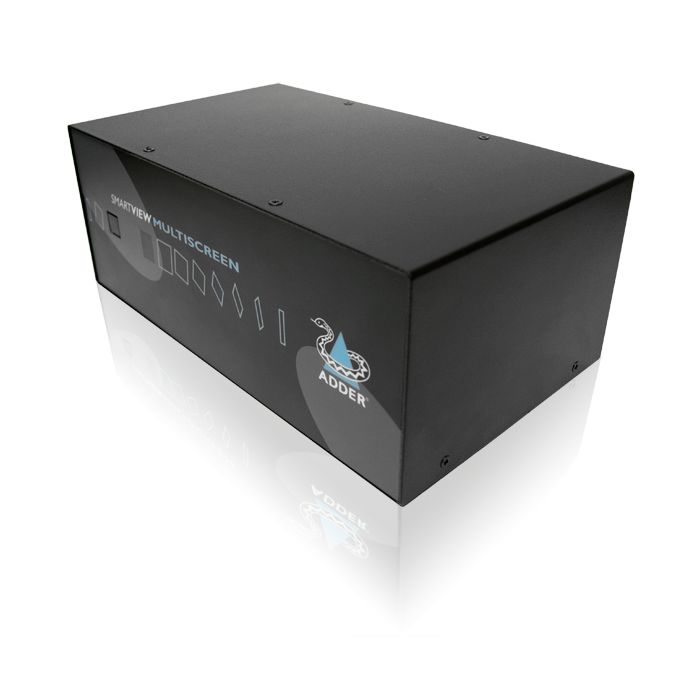

Adder Technology SVMS4-S KVM Switch
The Adder Technology SVMS4-S KVM Switch is built around a robust metal case designed to support efficient control of up to four computers in industrial and control room environments. It consolidates keyboard, mouse, and video signals into a single interface, reducing desk clutter and improving workflow in field-ready applications. The switch supports high bandwidth video with resolutions up to 1920 x 1440, suitable for precise monitoring and control tasks. Rear-mounted, colour-coded connectors aid in neat, organised installations, while its shock-resistant metal enclosure and CE and RoHS certifications underline its compliance with industrial durability standards.
Multiple computer selection options include front panel keys, keyboard hotkeys, RS232 commands, and an optional remote control, offering flexibility in deployment scenarios. The SVMS4-S is compatible with a broad range of operating systems and computer types, ensuring reliable integration across diverse systems. Operating between 0°C and +40°C, this device provides continuous-duty usage with minimal maintenance in typical industrial environments. Included rack-mount capability further supports organised setups in technical rooms.
SVMS4-S Features
- High Quality Video With Ddc Support
- Serial Line Switching
- Cascade Connections
- Increased Switching Capabilities
- Choice Of Switching Methods Including Remote
- VGA, RS232 Interface
- Features PS2 Connection
Request a Quote
Product Type
Manufacturer
Ruggedness
Mounting Format
Country Of Manufacture
United Kingdom
Case Material
Robust Metal Case
Certifications
CE, RoHS compliant
Additional Accessories
RC1: Remote control keypad
RC4: 4 button remote control switch with 2m cable
CCSUN: Converter for connecting a SUN computer to the Adder unit
VSC3: PS/2 style keyboard/mouse cable 2m
CCP2U: USB to PS/2 converter cable, USB type A to 2x
Cables
SmartView to keyboard, mouse and monitors - 2m if interface powered or 10m if PSU used. SmartView to computers - 5m if interface powered or 30m if PSU used. Adder 3-in-1 KVM cables recommended for keyboard, mouse and first video ports. High quality tri-c
Case Material
Robust Metal Case
Computer Connections
Computers may be selected using the front panel key, keyboard hotkeys, a three button mouse or wheel mouse, RS232 data commands or the optional remote controller. The hotkeys are selectable and are designed to be quick-fire using a minimum number of key p
Computer Connections RX
All RJ45 style Network port (ADDERView IP models only) RJ45 10/100Mb auto-sensing Ethernet port
Computer Connections At Switch
Video: HDD15,
Keyboard/Mouse: MiniDin6
Serial: DB9 female
Computer Selection
Computers may be selected using the front panel key, keyboard hotkeys, a three button mouse or wheel mouse, RS232 data commands or the optional remote controller. The hotkeys are selectable and are designed to be quick-fire using a minimum number of key p
Controls
Front panel key for computer selection. Numerical display shows selected computer and keyboard/mouse activity. Optional remote controller connects to rear. Base-mounted reset and option switches.
Flash Upgrades
Flash upgradeable to support new devices by connecting a computer's serial port to the options port and running a download program.
Hardware Compatibility
Compatible with desktop and laptop PCs, RS6000, SGI and DEC Alphas
Keyboard Ports
PS/2 or AT style keyboards supported. PS/2 keyboards plug in directly. AT keyboards require a 6-pin mini-DIN to 5-pin DIN adapter. Automatic mode emulation and num / caps / scroll updates ensures that the keyboard is always in the expected state. Modes 1,
Keyboard Support
PS/2 or AT style keyboards supported. PS/2 keyboards plug in directly. AT keyboards require a 6-pin mini-DIN to 5-pin DIN adapter. Automatic mode emulation and num / caps / scroll updates ensures that the keyboard is always in the expected state. Modes 1,
KVM Connections
All connectors are rear mounted to ensure a neat installation and are colour coded according to the PC99 specification (keyboard=violet, mouse=green, video=blue) for easy identification. Keyboard and mouse ports use 6-pin mini-DIN female connectors. Video
KVM Connectors
All connectors are rear mounted to ensure a neat installation and are colour coded according to the PC99 specification (keyboard=violet, mouse=green, video=blue) for easy identification. Keyboard and mouse ports use 6-pin mini-DIN female connectors. Video
Local Console
Video: HDD15
Keyboard/Mouse: MiniDin6
Serial: DB9 male
Options/Flash upgrade port: DB15 female
Local KVM Console Connection
Local console connections as stated above. CATx computer connections: all RJ45 style. 10/100 auto-sensing Ethernet network port: RJ45. Power connection: 2.5mm DC jack (5V DC, 2.5A). RS232 triggered power switching and syncing: DB9 plug
Mouse Ports
The controlling PS/2 style mouse plugs directly into the SmartView. SmartView supports 2 and 3 button mice and most wheel and scroll mice including the Microsoft IntelliMouse and IntelliMouse Explorer. PS/2 or RS232 mouse connections to computers may be m
Mouse Support
The controlling PS/2 style mouse plugs directly into the SmartView. SmartView supports 2 and 3 button mice and most wheel and scroll mice including the Microsoft IntelliMouse and IntelliMouse Explorer. PS/2 or RS232 mouse connections to computers may be m
No. Of Ports
4
Operation Mode
The keyboard, mouse and all the video heads are switched together so that the keyboard and mouse are controlling the computer whose video is currently displayed on the monitors.
Options Port Control
Plugs into the options port at the rear of the SmartView. Duplicates the SmartView's front panel key and numerical display. May be attached to the top of a keyboard or the side of a monitor by the Velcro strips supplied. 60 x 29 x 12 mm. White / cream fin
OS Compatibility
All known software and operating systems including Windows (all), DOS, Linux, Unix, BSD, Sun OS, Solaris, Mac OS, NetWare etc.
Physical Design
All Metal Case
Power
Interface powered from attached keyboard. Optional external power socket provided
Rackmount Options
RMK1 19" 1U rack mount kit included
Software Compatibility
All known software and operating systems including Windows (all), DOS, Linux, Unix, BSD, Sun OS, Solaris, Mac OS, NetWare etc.
Sync Switching
SmartView MultiScreens may be linked together via their options ports to provide synchronized switching of 8, 12 or 16 video channels controlled from one master unit.
System Connections
All connectors are rear mounted to ensure a neat installation and are colour coded according to the PC99 specification (keyboard=violet, mouse=green, video=blue) for easy identification. Keyboard and mouse ports use 6-pin mini-DIN female connectors. Video
User Console Connections
2 x 6 way mini DIN female connectors for controlling keyboards.
2 x 6 way mini DIN female connectors for controlling mice.
2 x 15 way HD D Female for controlling monitors.
1 x RJ45 port for remote user.
2 x 5V DC 2A power inlets for ex
Video Modes
High bandwidth video supported at resolutions up to 1920 x 1440. Low distortion and excellent video transfer characteristic. Supports VGA / SVGA / XGA / XGA-2 / SXGA and UXGA video and VESA DDC1 and DDC2 signalling. Screen saver feature with user selectab
Video Ports
High bandwidth video supported at resolutions up to 1920 x 1440. Low distortion and excellent video transfer characteristic. Supports VGA / SVGA / XGA / XGA-2 / SXGA and UXGA video and VESA DDC1 and DDC2 signaling. Screen saver feature with user selectabl
Operating Temperature
OPERATING: 0C to +40C
Ordering Info
SVMS4-S: 4 port single video head, single serial head KVM switch SVMS4-DS: 4 port dual video head, dual serial head KVM switch
The Adder Technology SVMS4-S KVM Switch is designed and engineered for use in demanding environments where reliability, durability are essential. The SVMS4-S supports a wide range of industries and operational applications.
Common deployment industries include: Broadcast and Media, Education, Energy and Utilities, Industrial Manufacturing, Public Sector, Security And Surveillance.
Across these sectors, the SVMS4-S is typically used in applications such as Broadcast And Media Control Consoles, Digital Signage And Information Terminals, Industrial HMI And Machine Interfacing, Process Control And Shop-Floor Monitoring, SCADA And Control-Room Access, Secure Access, Authentication, And Control Terminals, Secure Communications And Command-And-Control, Security And Surveillance Operations.
These examples demonstrate the versatility of the SVMS4-S across both industry sectors and real-world operational use cases. Its suitability extends well beyond the scenarios listed above, making it a flexible solution for a broad range of requirements.
For further information, or to assess whether the SVMS4-S is appropriate for your specific application, please contact us.
The Adder Technology SVMS4-S KVM Switch comes with a 1 Year Limited Warranty against defects in workmanship and materials, effective from the date of shipment (unless otherwise agreed in writing).
To receive service under this warranty, the eligible product, Adder Technology SVMS4-S KVM Switch, must be presented to RUGGED in the United Kingdom.
For more information about the Adder Technology SVMS4-S KVM Switch or to arrange repairs and services not covered by the warranty, please visit the warranty section on our website.
Request further details about the Adder Technology SVMS4-S KVM Switch
If you have any questions about the Adder Technology SVMS4-S please get in touch today, our team of technical experts are ready to assist you.
Alternative Products
Explore alternative products offering comparable features, performance, and build quality to the model you are currently viewing.
Our related solutions provide variations in configuration, functionality, and form factor to suit different application requirements. Each option has been selected to meet the same high standards of reliability and performance.
Browse the related products below to identify the most suitable fit for your deployment.
AVSC1102
- Hardware-based data diode
- Robust metal case with electromagnetic shielding
- Sealed enclosure for dust protection
- TEMPEST and EAL4+ certified

ALIF2112T
- Rugged metal casing
- Supports dual-link DVI up to 2560x1600
- AES 256-bit encryption and RSA 2048-bit authentication
- Compatibility with AdderLink Infinity management

AV8PRO-DVI
- Dual-link DVI up to 2560x1600
- True USB 2.0 emulation for reliable input
- Metal case with CE and RoHS compliance
- Supports multiple OS and RS232 control

AVSV1004
- Robust metal casing for durability
- Shielded cables prevent signal interception
- Rackmount design for space efficiency
- Compatible with major OS platforms

Having trouble finding what you're looking for?
Selecting the correct solution for your specific application and operating environment requires careful consideration.
At Rugged, our engineering and product specialists can advise on specifications, environmental suitability, mounting requirements, connectivity, and lifecycle planning to ensure the right fit for your deployment.
With extensive industry experience and a focus on reliability and performance, we help you select a solution aligned with your operational requirements.
Frequently Asked Questions
RUGGED offers free technical support for the lifetime of products you purchase. This includes help with setup, troubleshooting, and integration. Support is available online or directly from the technical team