


If you are unsure which product is best suited to your requirements, you can contact us directly for expert guidance. Share details such as your use case, environment, compatibility needs, and budget, and we will help you select the most appropriate solution.
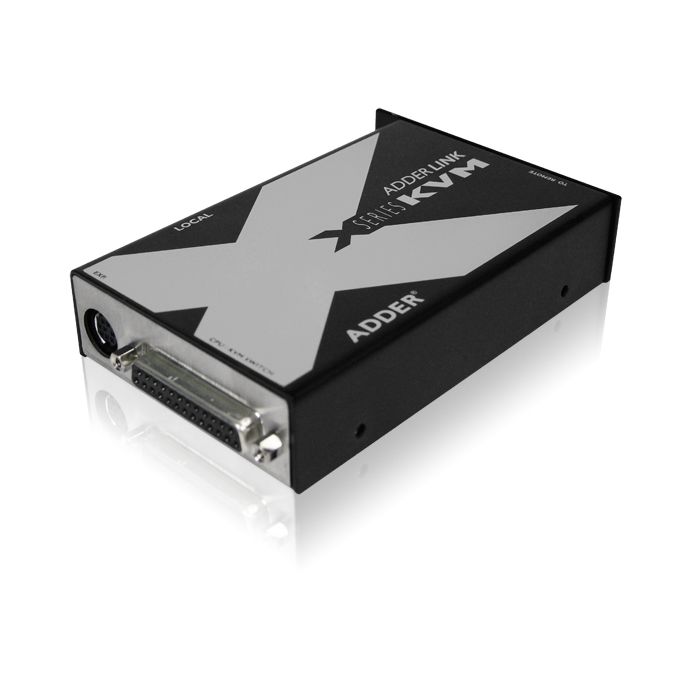

Adder Technology X-KVM KVM Switch
Designed for high-density data centres and control rooms, the Adder Technology X-KVM KVM Switch facilitates reliable remote management of multiple PCs or KVM units over Cat6 UTP cable up to 200 metres. Its robust metal enclosure is dust-sealed and vibration tolerant, enabling continuous-duty operation in commercial and industrial environments.
The switch delivers high-quality video at resolutions up to 1920 x 1440 and maintains reliable keyboard and mouse responsiveness through dynamic auto bandwidth adjustment and skew reporting. Rear-mounted, colour-coded connectors conform to PC99 standards for straightforward installation, and flash upgrade capability via keyboard port extends its operational lifespan without requiring hardware changes. Its use of differential analogue and digital signalling over a single CATx cable supports a clean setup in space-constrained scenarios. The X-KVM operates in 0 to 40°C environments and is CE and RoHS certified, reflecting durable, engineered construction for continuous deployment across commercial and industrial settings.
X-KVM Features
- Resolution Of Up To 1600 X 1280
- Includes CPU Connnection Cable
- High Security
- Flash Upgradeable
- Supports Automatic and Manual Video Compensation
- VGA, RS232 Interface
- Features PS2 Connection
Request a Quote
Product Type
Manufacturer
Ruggedness
Mounting Format
Country Of Manufacture
United Kingdom
Case Material
Robust Metal Case
Certifications
CE, RoHS compliant
Additional Accessories
Optional power adapter for local unit (part code: PSU-IEC-5VDC), X-Series rack mount chassis (part code: X-RMK-Chassis), rack mount plate for local/remote unit (part code: X-RMK-KVM/T for local and X-RMK-KVM/R for remote), Power distribution unit to power
Cables
SmartView to keyboard, mouse and monitors - 2m if interface powered or 10m if PSU used. SmartView to computers - 5m if interface powered or 30m if PSU used. Adder 3-in-1 KVM cables recommended for keyboard, mouse and first video ports. High quality tri-c
Case Material
Robust Metal Case
Computer Connections
Keyboard/Mouse: MiniDin6 Remote control: serial DB15
Computer Connections RX
All RJ45 style Network port (ADDERView IP models only) RJ45 10/100Mb auto-sensing Ethernet port
Computer Connections At Switch
1 x purple 6-pin mini-DIN female keyboard connector, 1 x green 6-pin mini-DIN female mouse connector, 1 x blue 15-pin high-density D-type female connector for monitor connection. 1 x RJ45 connector for CATx cable connection. 2.5mm DC jack for power adapte
Computer Selection
Computers may be selected using the front panel key, keyboard hotkeys, a three button mouse or wheel mouse, RS232 data commands or the optional remote controller. The hotkeys are selectable and are designed to be quick-fire using a minimum number of key p
Controls
Front panel key for computer selection. Numerical display shows selected computer and keyboard/mouse activity. Optional remote controller connects to rear. Base-mounted reset and option switches.
Devices Supported
Supports PS/2 style keyboard, PS/2 style mouse, flat-screen and CRT style monitors with standard HD-15 video connectors.
EXT Distance
Up to 200 metres / 650 ft using CATx cable (x=5,5e,6,7)
EXT Technology
Differential analogue signalling for video signals, differential digital signalling for PS/2 keyboard, PS/2 mouse and DDC signals. Signals are multiplexed so that only one CATx cable is required.
Flash Upgrades
The X-Series remote and local units are flash upgradeable to take advantage of product enhancements and upgrades. The units may be flash upgraded via the PS/2 keyboard ports from a connected computer. Flash upgrade mode is accessed using option switches m
Hardware Compatibility
Compatible with desktop, rack mount and laptop PCs with PS/2 keyboard and mouse connections. May also be used with RS/6000, Alpha and SGI computers and a wide range of KVM switches. ADDER can provide a range of KVM switch and conversion cables for connect
Indicators
The remote and local units are fitted with a link/activity indicator that shows the link status and indicate keyboard and mouse data activity.
Keyboard Control
The cable equalisation are controlled in 'configuration mode' using the keyboard attached to the remote (KVM console-end) unit. Configuration mode is accessed using keyboard hotkeys. These hotkeys may also be used to lock the remote unit (if a password ha
Keyboard Ports
PS/2 or AT style keyboards supported. PS/2 keyboards plug in directly. AT keyboards require a 6-pin mini-DIN to 5-pin DIN adapter. Automatic mode emulation and num / caps / scroll updates ensures that the keyboard is always in the expected state. Modes 1,
Keyboard Support
Supports PS/2 style keyboards with 6-pin mini-DIN connectors. Operates in modes, 1, 2 and 3 and supports individual typematic states per key. Supports standard layout keyboards and enhanced 'Internet style' keyboards with extra keys. Supports all keyboard
KVM Computer Connections
1 x 25-way female connector for computer connection, 1 x RJ45 connector for CATx cable connection. 2.5mm DC jack for optional power adapter (only required for video only applications).
KVM Connections
All connectors are rear mounted to ensure a neat installation and are colour coded according to the PC99 specification (keyboard=violet, mouse=green, video=blue) for easy identification. Keyboard and mouse ports use 6-pin mini-DIN female connectors. Video
KVM Connectors
All connectors are rear mounted to ensure a neat installation and are colour coded according to the PC99 specification (keyboard=violet, mouse=green, video=blue) for easy identification. Keyboard and mouse ports use 6-pin mini-DIN female connectors. Video
Local Console
Video: HDD15
Keyboard/Mouse: MiniDin6
Serial: DB9 male
Options/Flash upgrade port: DB15 female
Local KVM Console Connection
Local console connections as stated above. CATx computer connections: all RJ45 style. 10/100 auto-sensing Ethernet network port: RJ45. Power connection: 2.5mm DC jack (5V DC, 2.5A). RS232 triggered power switching and syncing: DB9 plug
Mouse Ports
The controlling PS/2 style mouse plugs directly into the SmartView. SmartView supports 2 and 3 button mice and most wheel and scroll mice including the Microsoft IntelliMouse and IntelliMouse Explorer. PS/2 or RS232 mouse connections to computers may be m
Mouse Support
Supports a wide range of PS/2 style 2 button, 3 button, wheel, IntelliMouse (3 button with wheel), IntelliMouse Explorer (5 button with wheel) and other mice that support the Microsoft ® mouse signalling protocols.
No. Of Ports
4
Operation Mode
The keyboard, mouse and all the video heads are switched together so that the keyboard and mouse are controlling the computer whose video is currently displayed on the monitors.
Options Port Control
Plugs into the options port at the rear of the SmartView. Duplicates the SmartView's front panel key and numerical display. May be attached to the top of a keyboard or the side of a monitor by the Velcro strips supplied. 60 x 29 x 12 mm. White / cream fin
OS Compatibility
Compatible with all major operating systems including DOS; OS/2; UNIX; MS Windows 9x, NT, 2000, XP; NetWare and RS6000.
Package Contents
Local (computer-end) unit, remote (KVM console-end) unit, 2 metre long computer interface cable, IEC style power supply and power cord, safety and installation leaflet, CD manual, stick on rubber feet. (Note: the X-Series rackpanels are not included and n
Physical Design
Physical (Local computer-end unit)
Metal case (steel and stainless steel), 122mm x 26mm x 75mm, 320g, fits into one slot width in the X-Series rack mount chassis (16 units fit into 2U of rack space).
Physical (Remote console-end unit)
<br
Power
The console-end unit is powered by an external 5V DC, 2A power supply with an IEC power cable connection. A country specific power cord is provided. The computer-end unit is normally interface powered via the PS/2 keyboard connection but may alternatively
PW Protect Mode
The X-Series may be locked using a hotkey combination from the keyboard if a password has been loaded into the unit. The unit may then only be unlocked using the password. The video is blanked whilst the remote unit is locked.
Rackmount Options
Both the local (computer-end) and remote (KVM console-end) units may be rack mounted in the X-Series rack mount chassis. This chassis enables 16 units to be mounted in 2U of 19-inch rack space. The units are rack mounted using the optional rack mount face
Software Compatibility
Compatible with all major operating systems including DOS; OS/2; UNIX; MS Windows 9x, NT, 2000, XP; NetWare and RS6000.
Spike Suppression
The X-Series is fitted with spike suppression circuits.
Sync Switching
SmartView MultiScreens may be linked together via their options ports to provide synchronized switching of 8, 12 or 16 video channels controlled from one master unit.
System Connections
All connectors are rear mounted to ensure a neat installation and are colour coded according to the PC99 specification (keyboard=violet, mouse=green, video=blue) for easy identification. Keyboard and mouse ports use 6-pin mini-DIN female connectors. Video
User Console Connections
2 x 6 way mini DIN female connectors for controlling keyboards.
2 x 6 way mini DIN female connectors for controlling mice.
2 x 15 way HD D Female for controlling monitors.
1 x RJ45 port for remote user.
2 x 5V DC 2A power inlets for ex
Video Comp
Adjustable video compensation amplifiers enable the video sharpness to be adjusted using the keyboard. Coarse and fine adjustment control is provided for quick setup. Settings are persistent even when the ADDERLink is powered off which means that setup on
Video Modes
High bandwidth video supported at resolutions up to 1920 x 1440. Low distortion and excellent video transfer characteristic. Supports VGA / SVGA / XGA / XGA-2 / SXGA and UXGA video and VESA DDC1 and DDC2 signalling. Screen saver feature with user selectab
Video Ports
High bandwidth video supported at resolutions up to 1920 x 1440. Low distortion and excellent video transfer characteristic. Supports VGA / SVGA / XGA / XGA-2 / SXGA and UXGA video and VESA DDC1 and DDC2 signaling. Screen saver feature with user selectabl
Operating Temperature
OPERATING: 0C to +40C
Ordering Info
SVMS4-S: 4 port single video head, single serial head KVM switch SVMS4-DS: 4 port dual video head, dual serial head KVM switch
The Adder Technology X-KVM KVM Switch is designed and engineered for use in demanding environments where reliability, durability and application suitability are essential. The X-KVM supports a wide range of industries and operational applications.
Common deployment industries include: Broadcast and Media, Education, Industrial Manufacturing, Logistics And Supply Chain, Public Sector, Security And Surveillance, Warehousing.
Across these sectors, the X-KVM is typically used in applications such as Digital Signage And Information Terminals, Industrial HMI And Machine Interfacing, Preventive And Corrective Maintenance, Process Control And Shop-Floor Monitoring, SCADA And Control-Room Access, Secure Access, Authentication, And Control Terminals.
These examples demonstrate the versatility of the X-KVM across both industry sectors and real-world operational use cases. Its suitability extends well beyond the scenarios listed above, making it a flexible solution for a broad range of requirements.
For further information, or to assess whether the X-KVM is appropriate for your specific application, please contact us.
The Adder Technology X-KVM KVM Switch comes with a 2 Year Limited Warranty against defects in workmanship and materials, effective from the date of shipment (unless otherwise agreed in writing).
To receive service under this warranty, the eligible product, Adder Technology X-KVM KVM Switch, must be presented to RUGGED in the United Kingdom.
For more information about the Adder Technology X-KVM KVM Switch or to arrange repairs and services not covered by the warranty, please visit the warranty section on our website.
Request further details about the Adder Technology X-KVM KVM Switch
If you have any questions about the Adder Technology X-KVM please get in touch today, our team of technical experts are ready to assist you.
Alternative Products
Explore alternative products offering comparable features, performance, and build quality to the model you are currently viewing.
Our related solutions provide variations in configuration, functionality, and form factor to suit different application requirements. Each option has been selected to meet the same high standards of reliability and performance.
Browse the related products below to identify the most suitable fit for your deployment.
ALIF1002
- Supports DVI-D video 1920x1200@60Hz
- Sealed network ports with failover redundancy
- Operates over CATx and fibre optic up to 10km
- Continuous-duty metal case for industrial use

AV4PRO-DVI
- Robust metal casing for durability
- Supports up to 2560 x 1600 resolution
- Full USB 2.0 peripheral compatibility
- Remote control and RS232 synchronization

AV4PRO-DP
- Reinforced metal casing and 1U rack-mount
- Supports 2560 x 1600 at 60Hz DisplayPort video
- Industrial-grade USB True Emulation 2.0
- Multiple switching methods including remote control

ALIF2112T
- Rugged metal casing
- Supports dual-link DVI up to 2560x1600
- AES 256-bit encryption and RSA 2048-bit authentication
- Compatibility with AdderLink Infinity management

Having trouble finding what you're looking for?
Selecting the correct solution for your specific application and operating environment requires careful consideration.
At Rugged, our engineering and product specialists can advise on specifications, environmental suitability, mounting requirements, connectivity, and lifecycle planning to ensure the right fit for your deployment.
With extensive industry experience and a focus on reliability and performance, we help you select a solution aligned with your operational requirements.
Frequently Asked Questions
RUGGED offers free technical support for the lifetime of products you purchase. This includes help with setup, troubleshooting, and integration. Support is available online or directly from the technical team
Adder Technology builds access control and encryption into its IP-based switches. The AVX5016IP, for instance, supports up to four simultaneous IP users with individual access controls and a separate local console, and protects communications with AES 128-bit encryption and RSA 2048-bit authentication. This makes the range suitable for secure access and command-and-control settings where unauthorised connection must be prevented. Physical security is reinforced by robust metal casing built for continuous operation. Security features and user-permission models differ between switches, so where access control is critical, confirm the encryption, authentication and per-user controls on the specific Adder product page before specifying.
Adder Technology is a UK manufacturer of KVM (keyboard, video, mouse) switches and AV/IT extension hardware, with 26 products in the Rugged catalogue. Its range spans local and IP-based KVM switches, KVM over IP, AV extenders and USB extenders, letting operators control multiple computers, servers and serial devices from a single console. Models include the ALIF and AVX series alongside AV4PRO and AV8PRO multi-head switches. They are built for control rooms, broadcast suites, data centres and industrial environments where centralised, secure access to many systems is needed. Exact ports, video support and feature set vary by model, so confirm the specification on the relevant product page.
Yes. Adder Technology switches are designed for control-room and command-centre work where operators need to view and control many machines from one position. The AVX5016IP, for example, manages 16 ports with both IP and serial console access, supports up to four simultaneous IP users with individual access controls, and runs AES 128-bit encryption with RSA 2048-bit authentication. Many models support standard PC, Sun and Mac video up to 1920 x 1200 at 60Hz, suiting SCADA, broadcast, security and surveillance consoles. Housings are typically robust 1U metal cases for rack mounting. Capabilities differ across the range, so check the individual product page for user count, encryption and resolution.
Both extend keyboard, video and mouse signals away from the host computer, but they work differently. A KVM extender such as the ALIF2002 carries video and USB over CATx or fibre to a fixed remote point, supporting DVI-D resolutions up to 1920 x 1200 at 60Hz with digital audio and bidirectional RS232. KVM over IP, by contrast, routes signals across a standard IP network so any authorised user can connect to any host, which suits larger and more flexible deployments. Several Adder units, including the ALIF and AVX IP models, support both approaches. The right choice depends on distance, user numbers and network design, so confirm on the product page.
Some do. Ruggedness varies across the Adder range, from semi-rugged extenders to military-grade switches. The AVX5016IP is rated military grade, reinforced for vibration and shock resistance to MIL-STD-810, and built in a robust metal case. Other units such as the ALIF2002 carry CE and RoHS compliance with an IP50 environment rating and reinforced metal housing rather than a military test standard. Operating temperature on many models runs from 0°C to 40°C. Because certification differs from product to product, always confirm the exact ratings, IP figure and standards on the specific Adder product page before specifying for a demanding environment.
Adder Technology switches are designed for broad compatibility. Models such as the AVX5016IP operate with PCs, Macs, Sun and other systems and work with effectively all known operating systems, including all Windows versions, DOS, Linux, Unix, BSD, Sun OS, Mac OS and NetWare. Connection to host machines is handled through modular Computer Access Modules supporting PS/2, USB and Sun interfaces, so mixed estates can be managed from one switch. Extenders in the ALIF range support DVI, USB, audio and RS232 peripherals. Supported interfaces and module options vary by model, so confirm the required connections and any additional modules on the relevant product page.
Yes. Several Adder Technology switches combine KVM control with serial and console access in one unit. The AVX5016IP provides both IP and serial console access across 16 ports, managing computers and serial devices from a single field-ready switch and integrating with RS232-triggered power and peripheral systems. Network connectivity is provided through a 10/100Mb auto-sensing Ethernet RJ45 port. Extenders such as the ALIF2002 pass RS232 between units at up to 115,200 baud for touchscreens, printers and similar peripherals. This consolidates control of mixed equipment and reduces infrastructure. Serial capabilities and port counts differ across the range, so verify them on the specific product page.
Adder Technology hardware is used wherever centralised, reliable control of multiple systems matters. In the Rugged catalogue these products are mapped to broadcast and media, energy and utilities, industrial manufacturing, public sector, security and surveillance, education and logistics. Typical applications include broadcast and media control consoles, SCADA and control-room access, emergency dispatch and incident management, secure access and authentication terminals, and security and surveillance operations. The IP-based models suit larger distributed estates, while extenders suit fixed point-to-point links. The right model depends on user numbers, distance and security needs, so review the application notes and specification on the individual product page.