


If you are unsure which product is best suited to your requirements, you can contact us directly for expert guidance. Share details such as your use case, environment, compatibility needs, and budget, and we will help you select the most appropriate solution.
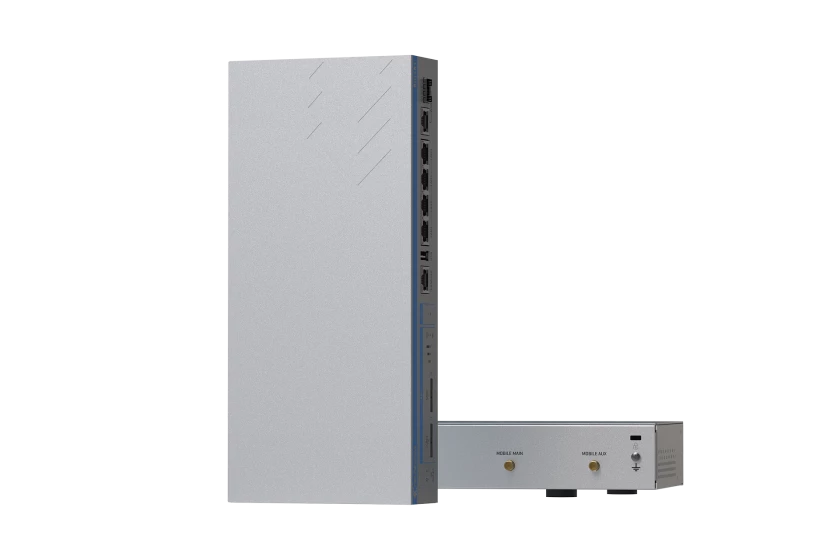

Teltonika RUTXR1 Enterprise Rack-Mountable SFP/LTE Router
Teltonika RUTXR1 is a rack-mountable enterprise router designed for industrial network setups requiring resilient and continuous connectivity. It supports dual SIM slots with automatic switching to maintain connection during signal interruptions or network failures. The device features multiple WAN options, including SFP fibre and Ethernet ports, with seamless failover for reliable network performance.
Built with a reinforced steel housing, the RUTXR1 withstands vibrations and extreme temperatures from -40 to 75 °C, making it suitable for harsh indoor rack environments. It offers LTE Cat 6 speeds up to 300 Mbps download and 50 Mbps upload, also compatible with 3G networks. Security is enhanced with WPA3, advanced firewall settings, and VPN protocols like IPsec and WireGuard to support sensitive network segments. The router includes surge protection, reverse polarity safeguards, and dual redundant power inputs rated 9 to 50 VDC, enabling robust 24/7 operation. Certified to CE, UKCA, and EMC standards, it incorporates remote management capabilities through Teltonika’s RMS platform for firmware updates and system monitoring, making it a durable solution for industrial networking needs.
RUTXR1 Features
- Cellular speeds up to 300Mbps with Carrier Aggregation
- SFP port for long-range Fiber-optic communication
- Wave-2 802.11ac Dual Band Wi-Fi
- Dual Power supply compatibility ensures uninterrupted service
Request a Quote
Product Type
Manufacturer
Ruggedness
Mounting Format
Country Of Manufacture
Lithuania
Mobile module
4G LTE Cat 6 up to 300 DL/ 50 UL Mbps; 3G up to 42 DL/ 5.76 UL Mbps
3GPP Release
Release 11
SIM switch
2 SIM cards, auto-switch cases: weak signal, data limit, SMS limit, roaming, no network, network denied, data connection fail, SIM idle protection
Status
IMSI, ICCID, operator, operator state, data connection state, network type, CA indicator, bandwidth, connected band, signal strength (RSSI), SINR, RSRP, RSRQ, EC/IO, RSCP, data sent/received, LAC, TAC, cell ID, ARFCN, UARFCN, EARFCN, MCC, and MNC
SMS
SMS status, SMS configuration, send/read SMS via HTTP POST/GET, EMAIL to SMS, SMS to EMAIL, SMS to HTTP, SMS to SMS, scheduled SMS, SMS autoreply, SMPP
USSD
Supports sending and reading Unstructured Supplementary Service Data messages
Black/White list
Operator black/white list (by country or separate operators)
Multiple PDN
Possibility to use different PDNs for multiple network access and services
Band management
Band lock, Used band status display
SIM idle protection service
When working with devices with two SIM slots, the one not currently in use will remain idle until the device switches to it, meaning that no data is used on the card until then
SIM PIN code management
SIM PIN code management enables setting, changing, or disabling the SIM card's PIN
APN
Auto APN
Bridge
Direct connection (bridge) between mobile ISP and device on LAN
Passthrough
Router assigns its mobile WAN IP address to another device on LAN
Wireless mode
802.11b/g/n/ac Wave 2 (Wi-Fi 5) with data transmission rates up to 867 Mbps (Dual Band, MU-MIMO), 802.11r fast transition, Access Point (AP), Station (STA)
Wi-Fi security
WPA2-Enterprise - PEAP, WPA2-PSK, WPA-EAP, WPA-PSK, WPA3-SAE, WPA3-EAP, OWE; AES-CCMP, TKIP, Auto-cipher modes, client separation, EAP-TLS with PKCS#12 certificates, disable auto-reconnect
SSID/ESSID
ESSID stealth mode
Wi-Fi users
Up to 150 simultaneous connections
Wireless Connectivity Features
Wireless mesh (802.11s), fast roaming (802.11r), Relayd, BSS transition management (802.11v), radio resource measurement (802.11k)
Wireless MAC filter
Whitelist, blacklist
Wireless QR code generator
Once scanned, a user will automatically enter your network without needing to input login information.
WAN
1 x WAN port 10/100/1000 Mbps, compliance with IEEE 802.3, IEEE 802.3u, 802.3az standards, supports auto MDI/MDIX crossover
Fibre
1 x SFP port (cannot work simultaneously with Ethernet WAN port)
LAN
4 x LAN ports, 10/100/1000 Mbps, compliance with IEEE 802.3, IEEE 802.3u, 802.3az standards, supports auto MDI/MDIX crossover
Routing
Static routing, Dynamic routing (BGP, OSPF v2, RIP v1/v2, EIGRP, NHRP), Policy based routing
Network protocols
TCP, UDP, IPv4, IPv6, ICMP, NTP, DNS, HTTP, HTTPS, SFTP, FTP, SMTP, SSL/TLS, ARP, VRRP, PPP, PPPoE, UPNP, SSH, DHCP, Telnet, SMPP, SNMP, MQTT, Wake On Lan (WOL)
VoIP passthrough support
H.323 and SIP-alg protocol NAT helpers, allowing proper routing of VoIP packets
Connection monitoring
Ping Reboot, Wget Reboot, Periodic Reboot, LCP and ICMP for link inspection
Firewall
Port forward, traffic rules, custom rules
Firewall status page
View all your Firewall statistics, rules, and rule counters
Ports management
View device ports, enable and disable each of them, turn auto-configuration on or off, change their transmission speed, and so on
Network topology
Visual representation of your network, showing which devices are connected to which other devices
Hotspot
Captive portal (hotspot), internal/external Radius server, Radius MAC authentication, SMS authorisation, SSO authentication, internal/external landing page, walled garden, user scripts, URL parameters, user groups, individual user or group limitations, user management, 9 default customisable themes and optionality to upload and download customised hotspot themes
DHCP
Static and dynamic IP allocation, DHCP relay, DHCP server configuration, status, static leases: MAC with wildcards
QoS / Smart Queue Management (SQM)
Traffic priority queuing by source/destination, service, protocol or port, WMM, 802.11e
DDNS
Supported >25 service providers, others can be configured manually
DNS over HTTPS
DNS over HTTPS proxy enables secure DNS resolution by routing DNS queries over HTTPS
Network backup
Wi-Fi WAN, Mobile, Fiber, VRRP, Wired options, each of which can be used as an automatic Failover
Load balancing
Balance Internet traffic over multiple WAN connections
SSHFS
Possibility to mount remote file system via SSH protocol
VRF support
Initial virtual routing and forwarding (VRF) support
802.1x
Port-based network access control client
Authentication
Pre-shared key, digital certificates, X.509 certificates, TACACS+, Internal & External RADIUS users authentication, IP & login attempts block, time-based login blocking, built-in random password generator
Firewall
Pre-configured firewall rules can be enabled via WebUI, unlimited firewall configuration via CLI; DMZ; NAT; NAT-T
Attack prevention
DDOS prevention (SYN flood protection, SSH attack prevention, HTTP/HTTPS attack prevention), port scan prevention (SYN-FIN, SYN-RST, X-mas, NULL flags, FIN scan attacks)
VLAN
Port and tag-based VLAN separation
Mobile quota control
Mobile data limit, customizable period, start time, warning limit, phone number
WEB filter
Blacklist for blocking out unwanted websites, Whitelist for specifying allowed sites only
Access control
Flexible access control of SSH, Web interface, CLI and Telnet
SSL certificate generation
Let's encrypt support
OpenVPN
Multiple clients and a server can run simultaneously, 27 encryption methods
OpenVPN Encryption
DES-CBC 64, RC2-CBC 128, DES-EDE-CBC 128, DES-EDE3-CBC 192, DESX-CBC 192, BF-CBC 128, RC2-40-CBC 40, CAST5-CBC 128, RC2-64-CBC 64, AES-128-CBC 128, AES-128-CFB 128, AES-128-CFB1 128, AES-128-CFB8 128, AES-128-OFB 128, AES-128-GCM 128, AES-192-CFB 192, AES-192-CFB1 192, AES-192-CFB8 192, AES-192-OFB 192, AES-192-CBC 192, AES-192-GCM 192, AES-256-GCM 256, AES-256-CFB 256, AES-256-CFB1 256, AES-256-CFB8 256, AES-256-OFB 256, AES-256-CBC 256
IPsec
XFRM, IKEv1, IKEv2, with 14 encryption methods for IPsec (3DES, DES, AES128, AES192, AES256, AES128GCM8, AES192GCM8, AES256GCM8, AES128GCM12, AES192GCM12, AES256GCM12, AES128GCM16, AES192GCM16, AES256GCM16)
GRE
GRE tunnel, GRE tunnel over IPsec support
PPTP, L2TP
Client/Server instances can run simultaneously, L2TPv3, L2TP over IPsec support
Stunnel
Proxy designed to add TLS encryption functionality to existing clients and servers without any changes in the program’s code
DMVPN
Method of building scalable IPsec VPNs
SSTP
SSTP client instance support
ZeroTier
ZeroTier VPN client support
WireGuard
WireGuard VPN client and server support
Tinc
Tinc offers encryption, authentication and compression in it's tunnels. Client and server support.
Tailscale
Tailscale offers speed, stability, and simplicity over traditional VPNs. Encrypted point-to-point connections using the open source WireGuard protocol
Supported modes
Supported connection types
Supported modes
Supported connection types
Client, Server
Custom registers
TCP
Supported data formats
Server, Client
Protocol
TCP, USB
Data to server
MODBUS TCP custom register block requests, which read/write to a file inside the router, and can be used to extend MODBUS TCP Client functionality
Modbus MQTT Gateway
8-bit: INT, UINT; 16-bit: INT, UINT (MSB or LSB first); 32-bit: float, INT, UINT (ABCD (big-endian), DCBA (little-endian), CDAB, BADC), HEX, ASCII
Supported modes
HTTP(S), MQTT, Azure MQTT, Kinesis
Supported connection
Extract parameters from multiple sources and different protocols, and send them all to a single server; Custom LUA scripting, allowing scripts to utilize the router's Data to server feature
DLMS Support
Allows sending commands and receiving data from MODBUS Server through MQTT broker
Supported modes
Station, Outstation
Supported connection types
TCP, USB
Teltonika Networks Web API (beta) support
DLMS - standard protocol for utility meter data exchange
WEB UI
Client
FOTA
TCP, USB
SSH
Expand your device's possibilities by using a set of configurable API endpoints to retrieve or change data. For more information, please refer to this documentation: https://developers.teltonika-networks.com
HTTP/HTTPS, status, configuration, FW update, CLI, troubleshoot, multiple event log servers, firmware update availability notifications, event log, system log, kernel log, Internet status
SMS
Firmware update from server, automatic notification
Call
SSH (v1, v2)
TR-069
Receive email message status alerts of various services
MQTT
SMS status, SMS configuration, send/read SMS via HTTP POST/GET
SNMP
Reboot, Status, Mobile data on/off, Output on/off, answer/hang-up with a timer, Wi-Fi on/off
JSON-RPC
OpenACS, EasyCwmp, ACSLite, tGem, LibreACS, GenieACS, FreeACS, LibCWMP, Friendly tech, AVSystem
RMS
MQTT Broker, MQTT publisher
ThingWorx
SNMP (v1, v2, v3), SNMP Trap, Brute force protection
Cumulocity - Cloud of Things
Management API over HTTP/HTTPS
Azure IoT Hub
Teltonika Remote Management System (RMS)
CPU
Allows monitoring of: WAN Type, WAN IP, Mobile Operator Name, Mobile Signal Strength, Mobile Network Type
RAM
Allows monitoring of: Device Model, Revision and Serial Number, WAN Type and IP, Mobile Cell ID, ICCID, IMEI, Connection Type, Operator, Signal Strength. Has reboot and firmware upgrade actions.
FLASH storage
Can be configured with Data to Server to send all the available parameters to the cloud. Has Direct method support which allows to execute RutOS API calls on the IoT Hub. Also has Plug and Play integration with Device Provisioning Service that allows zero-touch device provisioning to IoT Hubs
WEB UI
Quad-core ARM Cortex A7, 717 MHz
FOTA
256 MB, DDR3
RMS
256 MB, SPI Flash
Keep settings
Update FW from file, check FW on server, configuration profiles, configuration backup
Factory settings reset
Update FW
Operating system
Update FW/configuration for multiple devices at once
Supported languages
Update FW without losing current configuration
Development tools
A full factory reset restores all system settings, including the IP address, PIN, and user data to the default manufacturer's configuration
GPL customization
RutOS (OpenWrt based Linux OS)
Package Manager
Busybox shell, Lua, C, C++, and Python, Java in Package manager
NTRIP
SDK package with build environment provided
Data rate
You can create your own custom, branded firmware and web page application by changing colours, logos, and other elements in our firmware to fit your or your clients’ needs
Applications
The Package Manager is a service used to install additional software on the device
External devices
NTRIP protocol (Networked Transport of RTCM via Internet Protocol)
Storage formats
USB 2.0
Connector
Samba share, USB-to-serial
Input voltage range
Possibility to connect external HDD, flash drive, additional modem, printer, USB-serial adapter
Power consumption
FAT, FAT32, exFAT, NTFS (read-only), ext2, ext3, ext4
Ethernet
2 x 4-pin industrial DC power sockets for main and redundancy power source
Status LEDs
9 - 50 VDC, reverse polarity protection, voltage surge/transient protection
SIM
Idle: < 3W, max: 18W
Power
5 x RJ45 ports, 10/100/1000 Mbps
Antennas
2 x WAN type, 2 x Mobile connection type, 3 x Mobile signal strength, 2 x active SIM, 10 x Ethernet status, 2 x Console status, 2 x Power
USB
2 x SIM slots (Mini SIM - 2FF), 1.8 V/3 V, external SIM holders
Reset
2 x 4-pin DC connector
Grounding
2 x SMA for LTE, 2 x RP-SMA for Wi-Fi
Fibre
1 x USB A port for external devices
Casing material
Reboot/User default reset/Factory reset button
Dimensions (W x H x D)
1 x Grounding screw, 1 x lock
Weight
1 x SFP port
Mounting options
Full steel housing
Operating temperature
272 x 42.6 x 122.6 mm
Operating humidity
1093 g
Regulatory
Rack mounting kit
Standards
-40 °C to 75 °C
ESD
10% to 90% non-condensing
Radiated Immunity
CE, UKCA, EAC, UCRF, CITC, ANRT, RCM, NTC, CB
EFT
EN 55032:2015 + A11:2020EN 55035:2017 + A11:2020EN IEC 61000-3-2:2019EN 61000-3-3:2013 + A1:2019EN 301 489-1:V2.2.3EN 301 489-3:V2.1.1EN 301 489-17:V3.2.4Draft EN 301 489-52:V1.1.2
Surge Immunity (AC Mains Power Port)
EN 61000-4-2:2009
CS
EN IEC 61000-4-3:2006 + A1:2008 + A2:2010
DIP
EN 61000-4-4:2012
Standards
EN 61000-4-5:2014 + A1:2017
Standards
EN 61000-4-6:2014
The Teltonika RUTXR1 Enterprise Rack-Mountable SFP/LTE Router is designed and engineered for use in demanding environments where reliability, durability and application suitability are essential. The RUTXR1 supports a wide range of industries and operational applications.
Common deployment industries include: Construction, Energy and Utilities, Industrial Manufacturing, Logistics And Supply Chain, Marine And Offshore, Public Sector, Rail And Transport, Security And Surveillance.
Across these sectors, the RUTXR1 is typically used in applications such as Emergency Dispatch And Incident Management, Fleet Management And Telematics, Mobile Workforce Operations, Process Control And Shop-Floor Monitoring, SCADA And Control-Room Access, Secure Communications And Command-And-Control, Surveying, Mapping, And GIS Data Capture, Vehicle Diagnostics And Onboard Systems.
These examples demonstrate the versatility of the RUTXR1 across both industry sectors and real-world operational use cases. Its suitability extends well beyond the scenarios listed above, making it a flexible solution for a broad range of requirements.
For further information, or to assess whether the RUTXR1 is appropriate for your specific application, please contact us.
The Teltonika RUTXR1 Enterprise Rack-Mountable SFP/LTE Router comes with a 24 Month Limited Warrany against defects in workmanship and materials, effective from the date of shipment (unless otherwise agreed in writing).
To receive service under this warranty, the eligible product, Teltonika RUTXR1 Enterprise Rack-Mountable SFP/LTE Router, must be presented to RUGGED in the United Kingdom.
For more information about the Teltonika RUTXR1 Enterprise Rack-Mountable SFP/LTE Router or to arrange repairs and services not covered by the warranty, please visit the warranty section on our website.
Do you need further details about the Teltonika RUTXR1 Enterprise Rack-Mountable SFP/LTE Router, or would you like to discuss a customised solution or demonstration?
At RUGGED, we recognise that every project has its own unique demands. If you have any questions about the Teltonika RUTXR1 or need a custom Rugged Printer solution designed specifically for you, our team of technical experts are ready to assist you.
Alternative Products
Explore alternative products offering comparable features, performance, and build quality to the model you are currently viewing.
Our related solutions provide variations in configuration, functionality, and form factor to suit different application requirements. Each option has been selected to meet the same high standards of reliability and performance.
Browse the related products below to identify the most suitable fit for your deployment.
RUT142
- IP30 sealed aluminium casing
- Wide temperature range -40 °C to 75 °C
- Supports RS232 serial and dual Ethernet ports
- Runs RutOS with industrial protocol support

RUTC50
- Rugged anodized aluminium housing
- -40 to 75 6C operating range
- Dual SIM slots with automatic failover
- Dual-band Wi-Fi 6 and 5G connectivity

TCR100
- LTE Cat 6 up to 300 Mbps download
- Dual-band Wi-Fi 5 with MU-MIMO
- Operating range from -40 to 75°C
- WPA3 and enterprise-grade wireless security

RUTM08
- Rugged anodized aluminium casing
- Four Gigabit RJ45 ports for secure wired connections
- Wide operating temperature range -40 °C to 75 °C
- Supports advanced routing protocols and VPN standards

Having trouble finding what you're looking for?
Selecting the correct solution for your specific application and operating environment requires careful consideration.
At Rugged, our engineering and product specialists can advise on specifications, environmental suitability, mounting requirements, connectivity, and lifecycle planning to ensure the right fit for your deployment.
With extensive industry experience and a focus on reliability and performance, we help you select a solution aligned with your operational requirements.
Frequently Asked Questions
RUGGED offers free technical support for the lifetime of products you purchase. This includes help with setup, troubleshooting, and integration. Support is available online or directly from the technical team
Absolutely, industrial printers are built with durability and performance in mind, making them suitable for continuous operation and serving as a reliable 24/7 industrial printer. Unlike standard printers, they are engineered to withstand challenging conditions such as extreme temperatures, dust, and vibrations, ensuring consistent output without interruption.
Rugged Limited offers a range of industrial-grade printers specifically designed for these demanding applications. These robust devices are constructed with high-quality components that can endure prolonged use, minimising downtime and maximising productivity in critical operational settings. Their resilience means they can handle the continuous demands of various industries, making them an ideal choice when you need a dependable 24/7 industrial printer solution.
This continuous operational capability is crucial for businesses that require constant printing for tasks like labelling, ticketing, and data logging, where reliability is paramount. Rugged Limited’s industrial printers are designed to meet these rigorous demands, ensuring uninterrupted performance.
Rugged Limited understands the diverse connectivity requirements of modern industrial and logistical environments. Many of their rugged printers are designed with flexibility in mind, offering multiple connection methods to seamlessly integrate into existing systems.
For situations requiring stable and fast network communication over a wider area, many Rugged printers come equipped with Ethernet ports. This allows for reliable data transfer and remote management within a local area network (LAN).
Alternatively, for direct connection to a single device such as a computer or a handheld terminal, USB connectivity is a common feature. This plug-and-play simplicity makes it easy to set up and use the printer for localised tasks. The availability of both Ethernet and USB options ensures that a Rugged printer can adapt to various deployment scenarios, making a versatile Ethernet USB printer solution.
When considering a rugged printer from Rugged Limited, it’s beneficial to review the specific product’s technical specifications to confirm the exact connectivity options available for your operational needs.
Rugged Limited provides a selection of robust rugged printers that are built to withstand challenging conditions where standard printers would fail. These devices are engineered for durability, making them suitable for various industrial and field-based applications. These printers offer reliable performance for businesses needing to print labels, receipts, or other documents in harsh environments.
For further information on the specific models and their capabilities, exploring the dedicated rugged printer section on the Rugged Limited website is recommended.
Printers are fundamental to modern logistics, playing a vital role in ensuring efficient and accurate operations from warehousing to delivery. A robust logistics printer is used to produce a wide array of necessary documents, including shipping labels, packing slips, invoices, and inventory barcodes. These printed materials are crucial for tracking goods, managing stock, and facilitating smooth handovers between different stages of the supply chain.
For instance, in a warehouse, printers are used to generate labels for incoming and outgoing packages, enabling quick identification and sorting. During transit, delivery drivers rely on printed manifests and delivery notes. The ability to print on demand, often in challenging environments, highlights the necessity for durable and reliable printing solutions in this sector.
Rugged Limited provides a range of rugged printers specifically designed to withstand the harsh conditions often encountered in logistics, ensuring consistent performance and minimising downtime. Investing in the right logistics printer helps businesses maintain operational efficiency, improve accuracy, and enhance overall productivity.
Yes, many modern printers, particularly those designed for professional and industrial use, are capable of being networked. A network printer can be integrated into an existing network infrastructure, enabling multiple computers and devices to access and utilise the same printing device. This functionality enhances efficiency and resource sharing within various operational environments.
Rugged Limited offers a range of printers with networking capabilities, ensuring seamless integration and reliable performance. These are designed to meet diverse printing needs, from logistics to manufacturing, providing robust solutions for businesses looking to optimise their printing operations. Explore the various options for your business needs by visiting our rugged printers section.
Industrial printers are specifically engineered to withstand harsh operating conditions, and this often includes robust dust resistance. Such printers are designed with sealed casings and durable components to prevent ingress of dust and other particulates that can cause damage to internal mechanisms and compromise print quality. This makes them highly reliable in environments like manufacturing facilities, warehouses, and construction sites where dust is prevalent.
A high-quality dust resistant printer ensures continuous operation and reduces downtime, leading to increased productivity and lower maintenance costs. Rugged Limited’s industrial printers are built to offer this level of resilience, providing dependable printing solutions even in the most demanding, dust-filled settings. This focus on durability ensures their longevity and performance in industrial applications.
Rugged Limited provides a comprehensive range of rugged printers designed for demanding environments. These industrial printer types are categorised primarily by their printing technology, with options including thermal transfer and direct thermal printers. Each type offers distinct advantages depending on the application and desired label longevity.
Rugged Limited’s selection of industrial printer types ensures that businesses can find a solution tailored to their specific operational requirements, from warehousing and logistics to manufacturing and retail.
Rugged Limited specialises in providing printing solutions that are engineered to excel in challenging industrial environments. Our Rugged Printers are built to withstand the harsh conditions often found in manufacturing plants, warehouses, and other industrial settings. These environments can expose equipment to dust, dirt, moisture, extreme temperatures, and vibrations, all of which standard printers are not designed to handle.
An Industrial Printer from Rugged Limited offers robust construction and reliable performance, ensuring consistent operation and minimal downtime even in the most rigorous workplace conditions. We understand the critical need for dependable printing in industrial operations, where efficiency and accuracy are paramount.
For more information on our range of durable printing solutions, you can explore our selection of rugged printers built for tough applications.
Yes. Teltonika’s range includes several 5G Sub-6 GHz devices alongside its extensive 4G LTE line. The RUTX50 industrial router supports 5G SA and NSA with download speeds up to around 3.3 Gbps via 4×4 MIMO, with fallback to 4G LTE Cat 20 and 3G, plus dual-band Wi-Fi and five Gigabit Ethernet ports. The RUTM50 5G router reaches up to 3.4 Gbps using 4×4 MIMO, while the TRM500 brings 5G into a compact USB Type-C modem rated IP30. There is also the TRB500 5G industrial gateway for embedded and IoT use. Most pair 5G with dual SIM auto-failover for resilience. As band support, 3GPP release and throughput differ by model and hardware version, confirm the specification on the individual product page.
Teltonika’s TSW range extends its connectivity ecosystem into wired networking, covering unmanaged and managed Ethernet switches, PoE+ models and DIN-rail units. The TSW200, for instance, provides eight Gigabit PoE+ ports delivering up to 30 W per port within a 240 W budget, plus two SFP fibre ports, all in a full aluminium IP30 housing rated for -40 C to 75 C operation. It supports IEEE 802.3af and 802.3at PoE, jumbo frames up to 9216 bytes and a 20 Gbps non-blocking backplane. Buyers often choose Teltonika switches to keep routing, switching and gateway hardware within one vendor ecosystem and management approach. Port counts, PoE budgets, management capability and temperature ranges vary across the TSW line, so confirm the details on the specific product page.
Teltonika uses model prefixes to signal device class. RUT covers core industrial cellular and Ethernet routers, with RUTX denoting higher-specification routers featuring Gigabit Ethernet, dual-band Wi-Fi and, in the RUTX50, 5G. RUTM is a newer router line that includes 5G models such as the RUTM50. TRB designates compact industrial gateways, often single-purpose units for LTE, GPIO, RS232, RS485, M-Bus, NB-IoT or 5G connectivity. TRM identifies industrial cellular modems, including the 5G TRM500 with USB Type-C. TSW are Ethernet switches and TAP are Wi-Fi access points. This naming makes it easier to scope a build, but capabilities, bands and ruggedness still vary within each family, so confirm the exact specification on the relevant product page before ordering.
Resilience is a core design theme across Teltonika’s cellular range. Most routers, including the RUT956, RUTX50 and RUTM50, support dual SIM cards with automatic switching triggered by conditions such as weak signal, data limits, roaming, no network or connection failure, with SIM idle protection to avoid unnecessary data use. Beyond cellular, devices offer multiple WAN backup options across Wi-Fi WAN, mobile, VRRP and wired links, each usable for automatic failover, plus load balancing to spread traffic over several connections. VPN support spans IPsec, OpenVPN, WireGuard and more for secure tunnels, and connection monitoring with ping or periodic reboot keeps links healthy. The precise failover and VPN feature set depends on the model and firmware, so verify on the individual product page.
Teltonika devices on rugged.co.uk recur across energy and utilities, industrial manufacturing, logistics and supply chain, rail and transport, marine and offshore, oil and gas, natural resources and mining, defence and emergency services. Typical applications include SCADA and control-room access, fleet management and telematics, process control and shop-floor monitoring, industrial HMI, asset tracking and secure communications. The breadth of the range, from compact TRB gateways through RUT and RUTX routers to 5G RUTM and RUTX50 units, TSW switches and TAP access points, means a single vendor can address routing, gateway, switching and wireless needs across these sectors. As ratings and certifications such as IP30 and MIL-STD-810H are model-specific, match each device to its operating environment and confirm on the product page.
Teltonika Networks is a Lithuanian manufacturer specialising in industrial cellular and Ethernet connectivity, and it holds one of the largest connectivity ranges on rugged.co.uk with more than fifty products. The portfolio is unusually broad: RUT and RUTX cellular routers, RUTM and 5G models, TRB industrial gateways, TRM cellular modems, TSW Ethernet switches and TAP Wi-Fi access points. Most devices run RutOS, an OpenWrt-based Linux operating system, and are managed centrally through the Teltonika Remote Management System (RMS). The line spans entry-level 4G units through to 5G Sub-6 GHz routers, giving buyers a single ecosystem for routing, gateway, switching and wireless needs. Specifications differ widely across families, so confirm bands, ports and ratings on each product page.
Many Teltonika routers are built for demanding industrial use, though ruggedness varies by model. The RUT956, for example, uses a rugged aluminium housing rated IP30 against dust and debris, carries MIL-STD-810H vibration compliance, and operates across a wide -40 C to 75 C range. The 5G RUTX50 shares the aluminium IP30 build, the same wide temperature range and MIL-STD electromagnetic compatibility, with surge-protected 9 to 50 VDC input. Features such as DIN-rail mounting, wide-input DC power and reinforced casings are common across the industrial lines. That said, some models, including certain RUTM units, are rated non-rugged, so do not assume a uniform standard. Always verify the IP rating, temperature range and MIL-STD compliance on the specific product page before specifying.
RutOS is Teltonika’s OpenWrt-based Linux operating system that runs across its router, gateway and modem range, providing routing, firewall, VPN and extensive protocol support along with a package manager for adding software. The Teltonika Remote Management System (RMS) is the cloud platform that sits above it, allowing remote configuration, monitoring, firmware updates and bulk device control across a fleet from one place. Together they let operators deploy and maintain large numbers of devices without site visits, with firmware-over-the-air updates and configuration profiles. RutOS also supports SDK development, custom branded firmware and integrations with platforms such as Azure IoT Hub, Cumulocity and ThingWorx. The exact feature set depends on the device and firmware version, so confirm details on the relevant product page.